Saturday, 9 November 2013

Google Android 4.4 KitKat Released

Android 4.4 'KitKat' is the latest version of Google's mobile operating system.

For a long time we were expecting Google to announce Android 5.0 Key Lime Pie but it threw a spanner in the works and revealed 4.4 KitKat instead. It has now arrived on the Nexus 5 smartphone so here's what you need to know about the new Android version.

Android 4.4 KitKat

Android 4.4 KitKat: New features

The update from Android 4.2 Jelly Bean to 4.3 Jelly Bean was small only bringing a handful of improvements. Android 4.4 KitKat on the other hand is loaded with new features and tweaks.

Full-screen Immersive Mode
One of the biggest features to arrive with 4.4 KitKat is the immersive mode. Previously, the navigation buttons and status bar would take up real estate when browsing the web, reading a book or playing games.
Now, you can switch to full-screen to see more and simply swipe from the top or bottom edge of the screen to get the buttons back.
NFC
For those with NFC, Android 4.4 introduces a new, open architecture for NFC payments that works with any mobile operator. With host card emulation (HCE) means that any app on an Android device can emulate an NFC smart card. The system also lets apps manage your payment information in the cloud or on your device.
Ok Google
If you're familiar with Google Glass then you'll know saying 'Ok Glass' will activate voice control. Well the same is now true for your smartphone except you say 'Ok Google'. This will let you voice search, send a text, get directions or play a song - as long as you're on the homescreen on in Google Now.
Improved multi-tasking
Multi-tasking is pretty good in Android already but Google says it's even better in KatKat thanks to memory optimisation and "improving your touchscreen so that it responds faster and more accurately than ever before".
Low-power audio playback
Android 4.4 allows for more hours of audio playback, up to 60 hours on Nexus 5, according to Google. This is thanks to audio tunneling to a digital signal processor (DSP) in the device chipset. This means audio decoding and effects are off-loaded to the DSP, therefore waking the application processor less and using less battery.
Android 4.4 KitKat Caller IDCalls and messages
The new phone app orders your contacts based on the ones to interact with most and you can also search for contacts or nearby places in the search bar.
Caller ID has been tweaked so that if someone rings you and the number is not saved in your contacts, your phone will look for matches from businesses with a local listing on Google Maps so you know who it is.
The new Hangouts app combines all your text messages and MMS in one place with conversations and video calls.
Printing
Now you can print photos, documents, and web pages directly from your phone or tablet. You can print to any printer connected to Google Cloud Print, HP ePrint printers and others that have apps in the Google Play Store.
Android 4.4 KitKat printing
Google Drive
A handy new feature is the ability to save files, from apps like Quickoffice, to Google Drive (or other cloud storage providers). "And with quick access to recently used files, it's easier than ever to send the file you were just working on." said Google.
Bluetooth MAP support
Android 4.4 KitKat now supports the Message Access Profile (MAP) so cars with Bluetooth can exchange messages with your device.
Chromecast support
Google's Chromecast HDMI dongle is supported in 4.4 KitKat for wireless streaming of content such as Netflix and YouTube.
Chrome web view
Applications that embed web content now use Chrome to render web components accurately and quickly.
Device management built-in
If should lose your precious smartphone or tablet, you can find or remote wipe it with Google's Android Device Manager.
Downloads app redesign
Google has given the Downloads app a redesigned, adding a new sorting options plus list and grid views for all the files you've, er, downloaded.
Easy home screen switching
If you love customising to the extent that you have installed one or more home screen replacements, you can switch between them easily in 'Home' section of the settings menu.
Email app refresh
The Email app has also had a makeover with a new look, nested folders, contact photos and better navigation.
Full-screen wallpapers with preview
Wallpapers now display through the status bar and navigation bar. When picking a new wallpaper, you can preview what it will look like.
HDR+ photography
If you're getting the Nexus 5, its HDR+ mode snaps a burst of photos and combines them to give you the best possible single shot.
Android 4.4 KitKat interface
Infrared blasting
Android now supports applications for remote control of TVs and other nearby devices if you have an infrared (IR) transmitter.
Location in Quick Settings
There is now a new tile for location settings in the Quick Settings drop down menu.
Location modes and monitoring
If you make your battery last longer by constantly switching GPS, Wi-Fi and mobile data on and off then there's an easier way in KitKat. You can choose between 'high accuracy' and 'battery-saving' location modes in the settings menu. You can also see which apps have recently requested your location.
Music and movie-seeking and artwork on the lock screen
From the lock screen you can jump to a specific part of a song or video with a long press on the play or pause buttons. Artwork is now fills the lockscreen, too.
Secure app sandboxes
Application sandboxes have been hardened with Security-Enhanced Linux.
Step counting built-in
If you don't want to spend money on a fitness gadget then the Nexus 5 can act as a pedometer to count your steps. Google says updated hardware and software make this a more battery-friendly way to measure your activity.



Wednesday, 6 November 2013

Android 4.3 Jelly Bean Official Update for Samsung Galaxy S3 GT-I9300

Features and Changes:

Android 4.3 Jelly Bean is definitely a big update for the users of Galaxy S3 as they have been on Android 4.1.2 for a long time. Besides bumping your phones Android version to 4.3, this update also brings a lot of new features, changes and improvements. We have made a list of the new changes that we could notice:
  • Galaxy S4-like lockscreen with personal message feature
  • Multi-pages on lockscreen
  • Widget support on lockscreen
  • Tabbed UI in Settings
  • Daydream feature
  • Voice control feature for apps like phone, camera, music player, etc.
  • Hands-free Mode
  • Device UI now themed like that of Galaxy S4
  • New Notification Panel with 2 pages
  • Developer options is now hidden and appears when you tap “Build Number” for 7 times. See Detailed Guide Here.
  • ANT+ support
  • TRIM support
  • Improvements in camera
  • Sound and Shot mode in camera
  • Move apps to SD feature
  • New Samsung keyboard
  • Changed icons for some Samsung apps
  • Smoother TouchWiz
  • Adapt display
  • Adapt sound
  • New S-Voice from Galaxy S4
  • Full screen mode in Samsung apps
  • Support for Galaxy Gear
  • Many others….

Download Links:

More firmware will be added to the list as they are available!
Ireland (Vodafone): I9300XXUGMJ9_I9300VFGGMJ5_VDI.zip

Switzerland (Swisscom): SWC-I9300XXUGMJ9-20131105174531.zip  [mirror]

New Leaked Android 4.2.2 Jelly Bean Firmware on Samsung Galaxy S3 GT-I9300

The latest leak is actually an unofficial release that is still being tested for bugs and performance. I have been testing it on my S3 for a few hours and believe me it is pretty stable ad far more better that the earlier leak. That is not to say, the firmware is bugless but they are minor. The new leaked I9300XXUFME3 firmware, apart from bumping your phone’s OS version to 4.2.2, also comes with some pretty new features and enhancements directly from recently released Galaxy S4.

Having installed the new Android 4.2.2 leaked firmware on your Galaxy S3, you’ll feel more like owning a Galaxy S4. And if you are thinking of upgrading to S4, think again, as most of S4 features and apps have already made their way to Samsung’s old best-seller. Here is a short list of some of the new features and changes brought by the new firmware:
  • OS version bumps to the latest Android 4.2.2 Jelly Bean
  • New Lockscreen with several pages that can be personalized with multiple widgets and shortcuts. Improved ripple effect and light effect from the Galaxy S4. Now you can also set a personal message at the LS.
  • Now, there are two pages at the Notification panel with more shortcuts.
  • Android 4.2.2 Daydream feature.
  • Galaxy S4 like tabbed Settings interface.
  • Galaxy S4 S-Voice app
  • New Driving Mode (voice assistance feature)
  • Most apps now run full screen without showing the status bar (S4 feature)
  • A few new widgets (do not expect S4 AccuWeather widget)
  • Various new options under device Settings
  • Many others…

UPDATE !

A greater and better version of Android 4.2.2 Firmware for Galaxy S3 is now available. We recommend you to install the latest leaked firmware that is more stable.

Download Firmware:

As we mentioned above, the new leaked firmware is unbranded and therefore it can be installed on any Galaxy S3with model number GT-I9300 that is not locked to a carrier. Just download the Android 4.2.2 firmware from our link below and install it.
Since the firmware file is big and many of you might feel problems with downloading it, I have also added a mirror and torrent link for your convenience.

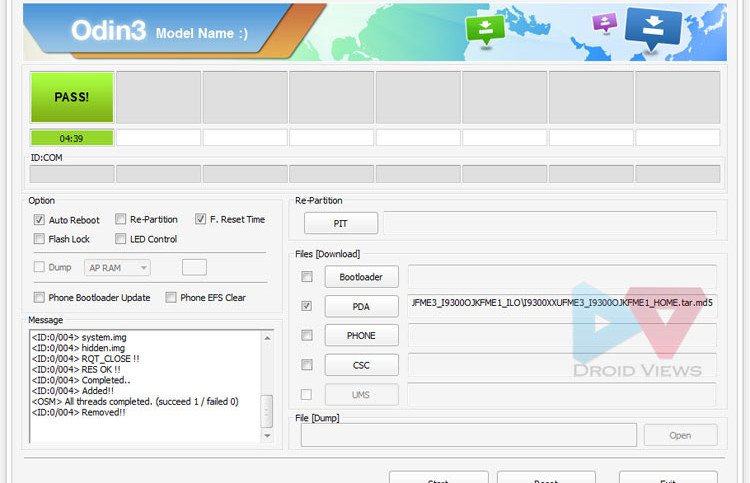
Download the firmware file in zip package and extract it on your desktop. Inside the extracted folder, you will find a file with .tar.md5 extension: I9300XXUFME3_I9300OJKFME1_HOME.tar.md5. To install the firmware, just put your device in USB Debugging mode, boot it into Download Mode 9Volume Down+Home+Power), launch Odin, click PDA, select the firmware file and hit the Start button.
android-4.2.2-galaxy-s3-odin

How to Add a Page to Blogger?

Blogger pages are designed to allow users to publish content on stand-alone pages that are linked to their blog's home page in Google Blogger. Pages are a good way for bloggers to highlight key features of their website without having it added to the timeline of the blog, such as contact information or an "About Me" section. Here are some steps on how to add a page to Blogger.


1) Log into your Blogger account. Once you are logged in, make sure you are at your Blogger's Dashboard, otherwise click on the "Dashboard" link, which will take you to a list of your blogs.

2) Add or write a new page. On your Blogger Dashboard, click on the "Posting" tab, then click on "Edit Pages." You will see a list of your current pages if there are any. Click on the blue button that says "New Page."

3) Publish your page. Write the content on your page just as you would do for a post, and click on Publish Page on the bottom to make it public for readers.

4) Add the Pages gadget. In order for readers to find and click on your pages, you will need to add their links to your blog, which can be done by adding the Pages gadget. The Pages gadget will allow you to add the page links to the top of your blog or in a sidebar.
  • Go to Blogger and click on the "Design" link from the main Dashboard. From the Page Elements link, click on "Add a Gadget." Scroll down until you locate Pages. Add this gadget to your blog by clicking on the blue icon with a plus symbol inside.
  • Move the Pages gadget within your layout either to the top of your blog or to the sidebar, depending on your preference. Click on the orange "Save" button for Blogger to accept your changes.
  • Modify the Pages gadget. The Pages gadget will allow you to customize the details of how you want your page links to appear. Optional modifications include re-ordering the pages, giving the Pages section a title, and having the option to rename the Home page where all your blog posts appear. You can also choose if you want new pages added to the list of links by default when you create new pages.
5)  Add HTML to create Pages tabs with custom templates. If you are using a custom template and not a Blogger template, Pages may not show up unless you modify the HTML code.
  • Remove the Pages gadget from your Blogger layout if it does not work. Go to Blogger and click on the "Design" link from the main Dashboard. From the Page Elements section, locate the Pages gadget and click on the "Edit" link. Scroll down to the bottom of your Pages gadget and click on "Remove."
  • Edit the HTML. Click on "Edit HTML" next to Page Elements on your Layout screen. Place a check-mark in the box next to Expand Widget Templates.
  • Locate the string of HTML to modify. Visit Google's Blogger Help website to view the current HTML you will need to modify at www.google.com/support/blogger/bin/answer.py?hl=en&answer=165955.
  • Preview your blog before saving modifications. Once you have modified the HTML, click on the blue "Preview" button to make sure your Pages tabs are showing. Click on "Save Template."
  • Re-add the Pages gadget to your blog. Now that you have modified the HTML code for your custom template, revisit the Layout screen and add the Pages gadget to your blog.

PCI BUS PARITY ERROR PCI SLOT? on HP Server

PCI BUS PARITY ERROR PCI SLOT?


Open up the case and check whether all the cards are fully seated. You can try pulling out each card and reinserting it.

2) Try checking the LED indications for the memory.
Also try reseting the memory modules.
Btw, how many memory modules are installed in the server?


Microsoft warns users of hacker attacks

http://www.bbc.co.uk/news/technology-24814999


Microsoft has warned that hackers could exploit a "vulnerability" in its operating system to gain user rights to the affected computers.


What is Adsense Watchdog, Zombiestat, Vampirestat, ?


What is Adsense Watchdog, Zombiestat, Vampirestat, ?

If you have a blog and check to see where the traffic to your blog originates, you may notice traffic from websites called Vampirestat.com, Adsensewatchdog.com, Uglystat.com and/or Zombiestat.com. First off, don't click on them to find out why they are sending you traffic.

Neither Adsensewatchdog, nor any of these others have anything whatsoever to do with Google or Google AdSense and are essentially spam sites that use automated traffic to blogs to attract clicks to their own sites from blog owners such as you. Once you're at their site, at a minimum, you'll be fed ads. At worst, you might fall victim to malevolent code that seeks to infect your computer with who knows what (although I haven't verified that these particular sites are seeking to plant anything on your machine).

Stay away. Traffic from these sites won't affect your standing with the real Adsense, so just ignore them. 

Adsense Watchdog and the others can be traced to: 

Protected Domain Services - Customer ID: NCR-3559746
P.O. Box 6197
Denver
CO
80206
US
Phone: +1.3037474010
Email Address: adsensewatchdog.com@protecteddomainservices.com

Which is just a company that holds domain names for anonymous clients. If the domain owner wishes to stay hidden behind such a firewall of anonymity, that's should be another red flag.