Having installed the new Android 4.2.2 leaked firmware on your Galaxy S3, you’ll feel more like owning a Galaxy S4. And if you are thinking of upgrading to S4, think again, as most of S4 features and apps have already made their way to Samsung’s old best-seller. Here is a short list of some of the new features and changes brought by the new firmware:
- OS version bumps to the latest Android 4.2.2 Jelly Bean
- New Lockscreen with several pages that can be personalized with multiple widgets and shortcuts. Improved ripple effect and light effect from the Galaxy S4. Now you can also set a personal message at the LS.
- Now, there are two pages at the Notification panel with more shortcuts.
- Android 4.2.2 Daydream feature.
- Galaxy S4 like tabbed Settings interface.
- Galaxy S4 S-Voice app
- New Driving Mode (voice assistance feature)
- Most apps now run full screen without showing the status bar (S4 feature)
- A few new widgets (do not expect S4 AccuWeather widget)
- Various new options under device Settings
- Many others…
UPDATE !
A greater and better version of Android 4.2.2 Firmware for Galaxy S3 is now available. We recommend you to install the latest leaked firmware that is more stable.
Download Firmware:
As we mentioned above, the new leaked firmware is unbranded and therefore it can be installed on any Galaxy S3with model number GT-I9300 that is not locked to a carrier. Just download the Android 4.2.2 firmware from our link below and install it.
Since the firmware file is big and many of you might feel problems with downloading it, I have also added a mirror and torrent link for your convenience.
MUK Upload Link: I9300XXUFME7_I9300OXAFME7_OXA.zip
Mega Link: I9300XXUFME7_I9300OXAFME7_OXA.zip
Torrent Link: I9300XXUFME7_I9300OXAFME7_OXA.zip.torrent
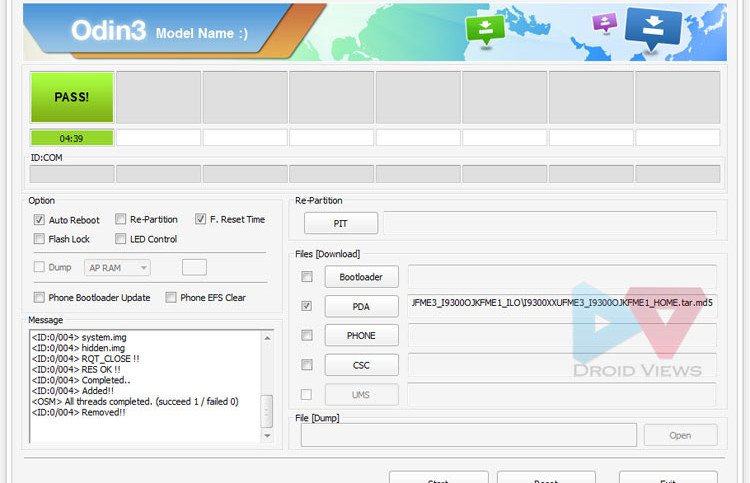
Download the firmware file in zip package and extract it on your desktop. Inside the extracted folder, you will find a file with .tar.md5 extension: I9300XXUFME3_I9300OJKFME1_HOME.tar.md5. To install the firmware, just put your device in USB Debugging mode, boot it into Download Mode 9Volume Down+Home+Power), launch Odin, click PDA, select the firmware file and hit the Start button.


No comments:
Post a Comment